How to predict by coordinate

Input the genomic coordinates of your region of interest, using hg38 as the reference genome. This input is the most flexible, and is unconstrained by sequencing coverage or any annotation. Be sure to double-check that the output sequence matches your expected region, and check that the output coverage of A/C bases is above the recommended 70%, which is reflective of DMS-modifiable bases meeting all coverage and quality filters.

For most users, only one set of coordinates will be used to define their region of interest. However, two sets of coordinates may be needed when joining two separate regions together, such as when crossing a splice junction.

When analyzing a region within a larger transcript, it is generally recommended to test “buffer” regions, where the region of interest should be extended by 20-50 nt on each end in order to reduce the likelihood of structures being arbitrarily interrupted by the region borders.

Due to computational and server constraints, users will be limited to a maximum input length of 500 nucleotides and a maximum output of 5 predicted structures, though some regions may yield fewer than that. If this does not suit your needs, consider downloading and running the data and code locally (see Download ).
Predict by Gene


Advanced Options
Chromosomal Coordinates (max 500bp)
Coords 1  
Additional Coordinates
Coords 2 Optional
Coords 3 Optional
Coords 4 Optional


CALD1
ENST00000424922 (+) ENSG00000122786 (+)

Visualize entire gene
100
150
300
500
+
-
Predict

  Region Local Coords Chrom Coords Length R N Gini Action
1
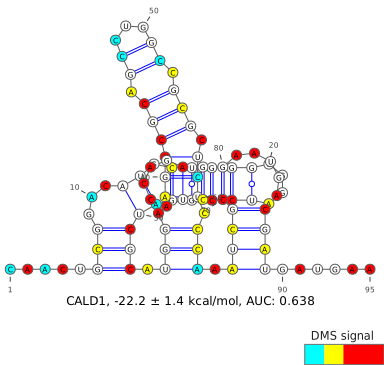
5'UTR,CDS 1-95 134891610-134891673 / 134928754-134928784 95 0.5828 50 0.30
2
CDS 97-187 134928786-134928876 91 0.8867 50 0.23
3
CDS 193-278 134928882-134928900 / 134932988-134933054 86 0.8376 50 0.20
4
CDS 281-370 134933057-134933146 90 0.8733 50 0.21
5
CDS 371-447 134933147-134933223 77 0.7367 50 0.18
6
CDS 448-529 134933224-134933305 82 0.8109 50 0.18
7
CDS 532-615 134933308-134933390 / 134941092-134941092 84 0.6676 50 0.21
8
CDS 617-697 134941094-134941174 81 0.7488 50 0.18
9
CDS 698-788 134941175-134941237 / 134947508-134947535 91 0.8294 50 0.22
10
CDS 789-890 134947536-134947637 102 0.8209 50 0.27
11
CDS 891-990 134947638-134947737 100 0.8352 50 0.20
12
CDS 991-1082 134947738-134947769 / 134950374-134950433 92 0.7004 50 0.15
13
CDS 1083-1171 134950434-134950514 / 134958069-134958076 89 0.7422 50 0.18
14
CDS 1173-1262 134958078-134958112 / 134958209-134958263 90 0.8062 50 0.22
15
CDS 1263-1349 134958264-134958290 / 134959974-134960033 87 0.7678 50 0.22
16
CDS 1355-1444 134960039-134960111 / 134960533-134960549 90 0.7759 50 0.22
17
CDS 1448-1532 134960553-134960628 / 134965306-134965314 85 0.7841 50 0.20
18
CDS,3'UTR 1533-1622 134965315-134965386 / 134968340-134968357 90 0.8644 50 0.20
19
3'UTR 1623-1737 134968358-134968472 115 0.7916 50 0.30
20
3'UTR 1738-1833 134968473-134968568 96 0.7025 50 0.21
21
3'UTR 1835-1920 134968570-134968655 86 0.7523 50 0.23
22
3'UTR 1921-2032 134968656-134968767 112 0.7349 50 0.26
23
3'UTR 2033-2121 134968768-134968856 89 0.5907 44 0.20
Download CSV

Custom Gene Windows

No custom gene windows have been created yet.
Gene Window Instructions/Interpretation
  1. Search for a gene by name. For each gene, only the canonical transcript (as defined by UCSC in GRCh38.106) is shown. Some gene names may correspond to multiple genomic locations.
  2. For the selected gene, a scatterplot showing the Gini indices, where a high Gini index corresponds to a highly-structured region, for small windows within the transcript. For small RNAs, these windows are sized 20 valid (coverage- and quality-filtered) A/C data points; for all other transcripts, these windows are sized 50 valid A/C data points, due to the ability of DMS to modify primarily A/C bases. In regions with sufficient coverage, these windows correspond to actual transcript lengths of roughly 40 and 100 nucleotides, respectively.
  3. Select a window of interest, either from the scatter plot or from the table below. Generally, windows with a high Gini will yield better results, where the DMS signal aligns more accurately with the predicted base-pais. Windows with high Gini indices relative to the rest of the transcript can also be used to find functional structural elements (ex: TFRC iron response elements).
  4. If previously-defined windows do not suit your needs, you can define a custom window either using (1) the slider below the scatterplot, which shows both a heatmap of previously-defined windows as well as the locations of each UTR and CDS; or (2) custom coordinate-based entry via Predict by Coordinates.
See About for more information on the dataset and for best practices in structure determination.
production / 6f779e32bc / 2026-02-04 19:07