How to predict by coordinate

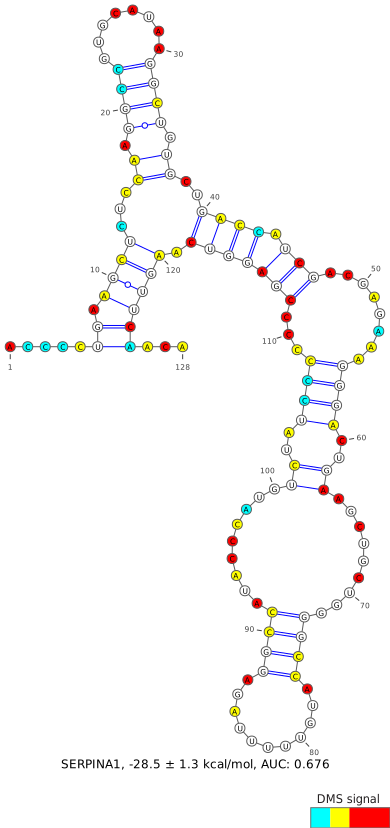
Input the genomic coordinates of your region of interest, using hg38 as the reference genome. This input is the most flexible, and is unconstrained by sequencing coverage or any annotation. Be sure to double-check that the output sequence matches your expected region, and check that the output coverage of A/C bases is above the recommended 70%, which is reflective of DMS-modifiable bases meeting all coverage and quality filters.

For most users, only one set of coordinates will be used to define their region of interest. However, two sets of coordinates may be needed when joining two separate regions together, such as when crossing a splice junction.

When analyzing a region within a larger transcript, it is generally recommended to test “buffer” regions, where the region of interest should be extended by 20-50 nt on each end in order to reduce the likelihood of structures being arbitrarily interrupted by the region borders.

Due to computational and server constraints, users will be limited to a maximum input length of 500 nucleotides and a maximum output of 5 predicted structures, though some regions may yield fewer than that. If this does not suit your needs, consider downloading and running the data and code locally (see Download ).
Predict by Gene


Advanced Options
Chromosomal Coordinates (max 500bp)
Coords 1  
Additional Coordinates
Coords 2 Optional
Coords 3 Optional
Coords 4 Optional


SERPINA1
ENST00000448921 (-) ENSG00000197249 (-)

Visualize entire gene
100
150
300
500
+
-
Predict

  Region Local Coords Chrom Coords Length R N Gini Action
1
5'UTR,CDS 549-656 94383155-94383241 / 94388560-94388580 108 0.3697 50 0.29
2
CDS 660-763 94383048-94383151 104 0.4901 50 0.30
3
CDS 857-950 94382861-94382954 94 0.3519 50 0.32
4
CDS 951-1043 94382768-94382860 93 0.3033 50 0.27
5
CDS 1048-1130 94382681-94382763 83 0.2622 50 0.25
6
CDS 1132-1242 94381119-94381141 / 94382592-94382679 111 0.4373 50 0.26
7
CDS 1245-1338 94381023-94381116 94 0.4786 50 0.27
8
CDS 1342-1437 94380924-94381019 96 0.4876 50 0.25
9
CDS 1438-1515 94379587-94379611 / 94380871-94380923 78 0.3921 50 0.28
10
CDS 1516-1619 94379483-94379586 104 0.5268 50 0.27
11
CDS 1620-1747 94378532-94378640 / 94379464-94379482 128 0.4234 69 0.27
Download CSV

Custom Gene Windows

No custom gene windows have been created yet.
Gene Window Instructions/Interpretation
  1. Search for a gene by name. For each gene, only the canonical transcript (as defined by UCSC in GRCh38.106) is shown. Some gene names may correspond to multiple genomic locations.
  2. For the selected gene, a scatterplot showing the Gini indices, where a high Gini index corresponds to a highly-structured region, for small windows within the transcript. For small RNAs, these windows are sized 20 valid (coverage- and quality-filtered) A/C data points; for all other transcripts, these windows are sized 50 valid A/C data points, due to the ability of DMS to modify primarily A/C bases. In regions with sufficient coverage, these windows correspond to actual transcript lengths of roughly 40 and 100 nucleotides, respectively.
  3. Select a window of interest, either from the scatter plot or from the table below. Generally, windows with a high Gini will yield better results, where the DMS signal aligns more accurately with the predicted base-pais. Windows with high Gini indices relative to the rest of the transcript can also be used to find functional structural elements (ex: TFRC iron response elements).
  4. If previously-defined windows do not suit your needs, you can define a custom window either using (1) the slider below the scatterplot, which shows both a heatmap of previously-defined windows as well as the locations of each UTR and CDS; or (2) custom coordinate-based entry via Predict by Coordinates.
See About for more information on the dataset and for best practices in structure determination.
production / 05e29e215d / 2026-04-06 17:12