How to predict by coordinate

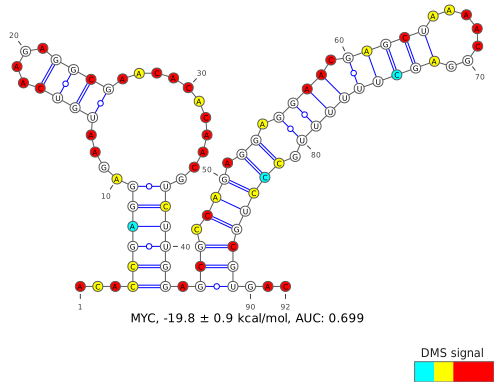
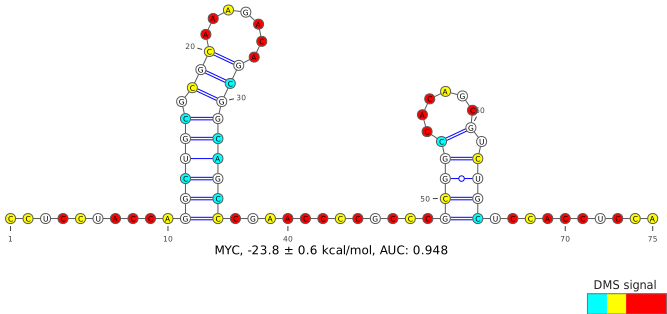
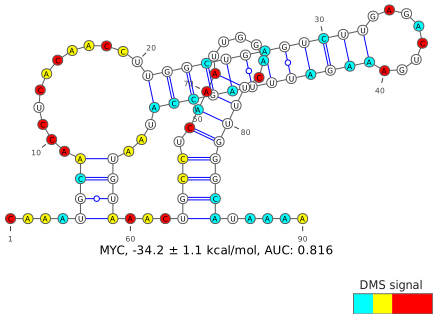
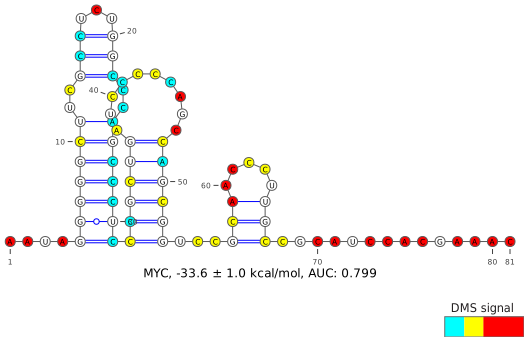
Input the genomic coordinates of your region of interest, using hg38 as the reference genome. This input is the most flexible, and is unconstrained by sequencing coverage or any annotation. Be sure to double-check that the output sequence matches your expected region, and check that the output coverage of A/C bases is above the recommended 70%, which is reflective of DMS-modifiable bases meeting all coverage and quality filters.

For most users, only one set of coordinates will be used to define their region of interest. However, two sets of coordinates may be needed when joining two separate regions together, such as when crossing a splice junction.

When analyzing a region within a larger transcript, it is generally recommended to test “buffer” regions, where the region of interest should be extended by 20-50 nt on each end in order to reduce the likelihood of structures being arbitrarily interrupted by the region borders.

Due to computational and server constraints, users will be limited to a maximum input length of 500 nucleotides and a maximum output of 5 predicted structures, though some regions may yield fewer than that. If this does not suit your needs, consider downloading and running the data and code locally (see Download ).
Predict by Gene


Advanced Options
Chromosomal Coordinates (max 500bp)
Coords 1  
Additional Coordinates
Coords 2 Optional
Coords 3 Optional
Coords 4 Optional


MYC
ENST00000621592 (+) ENSG00000136997 (+)

Visualize entire gene
100
150
300
500
+
-
Predict

  Region Local Coords Chrom Coords Length R N Gini Action
1
5'UTR 2-117 127736232-127736347 116 0.6153 50 0.29
2
5'UTR 119-199 127736349-127736429 81 0.7461 50 0.36
3
5'UTR 204-292 127736434-127736522 89 0.6632 50 0.25
4
5'UTR,CDS 293-397 127736523-127736623 / 127738248-127738251 105 0.7980 50 0.30
5
CDS 398-483 127738252-127738337 86 0.6434 50 0.26
6
CDS 485-571 127738339-127738425 87 0.3709 50 0.20
7
CDS 574-660 127738428-127738514 87 0.6709 50 0.32
8
CDS 662-764 127738516-127738618 103 0.6925 50 0.23
9
CDS 767-853 127738621-127738707 87 0.6482 50 0.28
10
CDS 857-931 127738711-127738785 75 0.6339 50 0.28
11
CDS 933-1021 127738787-127738875 89 0.4790 50 0.24
12
CDS 1022-1110 127738876-127738964 89 0.6913 50 0.29
13
CDS 1111-1191 127738965-127739019 / 127740396-127740421 81 0.6073 50 0.26
14
CDS 1192-1288 127740422-127740518 97 0.7710 50 0.26
15
CDS 1289-1366 127740519-127740596 78 0.7718 50 0.24
16
CDS 1367-1451 127740597-127740681 85 0.7122 50 0.22
17
CDS 1454-1545 127740684-127740775 92 0.8828 50 0.21
18
CDS 1546-1626 127740776-127740856 81 0.6591 50 0.20
19
CDS 1627-1711 127740857-127740941 85 0.7512 50 0.26
20
CDS,3'UTR 1714-1804 127740944-127741034 91 0.7643 50 0.28
21
3'UTR 1806-1895 127741036-127741125 90 0.8813 50 0.44
22
3'UTR 1897-2014 127741127-127741244 118 0.7681 50 0.37
23
3'UTR 2015-2167 127741245-127741397 153 0.6710 64 0.41
Download CSV

Custom Gene Windows

No custom gene windows have been created yet.
Gene Window Instructions/Interpretation
  1. Search for a gene by name. For each gene, only the canonical transcript (as defined by UCSC in GRCh38.106) is shown. Some gene names may correspond to multiple genomic locations.
  2. For the selected gene, a scatterplot showing the Gini indices, where a high Gini index corresponds to a highly-structured region, for small windows within the transcript. For small RNAs, these windows are sized 20 valid (coverage- and quality-filtered) A/C data points; for all other transcripts, these windows are sized 50 valid A/C data points, due to the ability of DMS to modify primarily A/C bases. In regions with sufficient coverage, these windows correspond to actual transcript lengths of roughly 40 and 100 nucleotides, respectively.
  3. Select a window of interest, either from the scatter plot or from the table below. Generally, windows with a high Gini will yield better results, where the DMS signal aligns more accurately with the predicted base-pais. Windows with high Gini indices relative to the rest of the transcript can also be used to find functional structural elements (ex: TFRC iron response elements).
  4. If previously-defined windows do not suit your needs, you can define a custom window either using (1) the slider below the scatterplot, which shows both a heatmap of previously-defined windows as well as the locations of each UTR and CDS; or (2) custom coordinate-based entry via Predict by Coordinates.
See About for more information on the dataset and for best practices in structure determination.
production / 05e29e215d / 2026-04-03 23:15